Document check passes → Selfie captured → Liveness prompt passes → Face match passes → Account approved
Every control can work as designed while a synthetic or injected face passes through. The authenticity question was never asked.
Selfie verification / NeuroVerify
Banks, fintechs and platforms in every region rely on one selfie to prove a real person is applying. NeuroVerify checks that selfie for deepfakes, face swaps and injected media beyond liveness, and returns one unified risk score with signal-level evidence.
It fits the selfie and liveness step you already run: no new step for the user, one API call with the media you already capture.
NeuroVerify does not verify identity, match faces to documents or approve applications; it adds authenticity evidence for your own identity checks and policy to use.
The gap
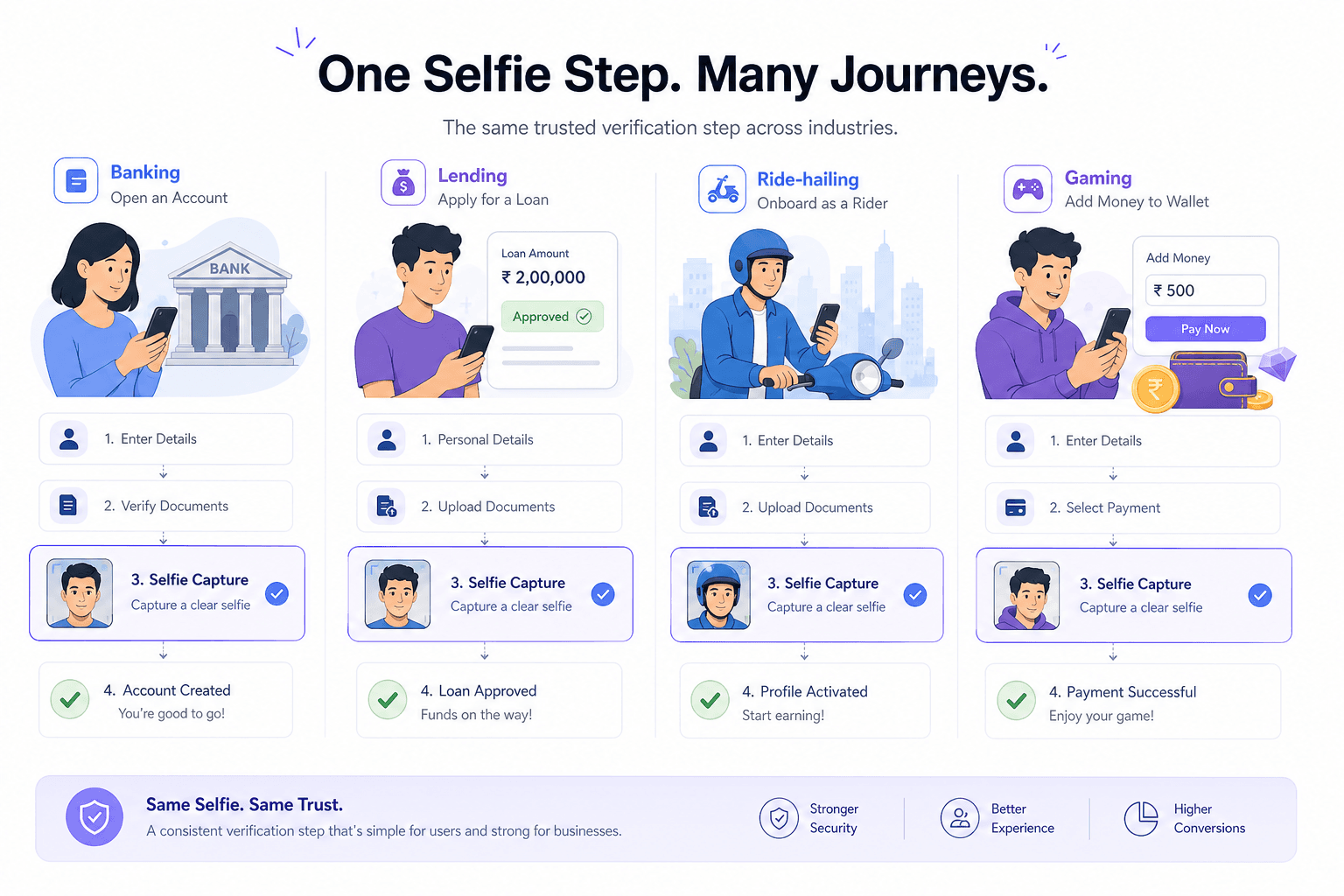
Selfie verification is the same capture point repeated across very different products: account opening, loan applications, marketplace seller onboarding, gig-worker activation, wallet limits and account recovery. The document layer changes from country to country. The selfie step barely changes.
Document and registry checks confirm that a record exists and looks valid. They say nothing about the face submitting the form.
Face match confirms that two face images appear to belong to the same person. It does not confirm that either image was captured live, unaltered, or through a camera at all.
Basic liveness confirms that the capture satisfied the presentation checks that were implemented, such as blinks, head turns or texture cues tuned for printed photos and screens. A manipulated or synthetic image that arrives as a normal file may never give those checks anything physical to react to.
Document check passes → Selfie captured → Liveness prompt passes → Face match passes → Account approved
Every control can work as designed while a synthetic or injected face passes through. The authenticity question was never asked.
This is why deepfake detection and liveness solve different problems. Liveness asks whether a person appears present. Deepfake detection asks how the media was produced.
In a fast digital journey, the selfie is often the only human-proof control between a record and a live account. After approval, the loss is hard to reverse. International guidance on digital identity, including the FATF digital identity guidance, stresses assurance that matches the risk of the journey. A face-swap app on a mid-range phone now lowers the cost of attacking that step.
Threats
These are attack techniques, not claims about any institution. Each is a route by which a convincing selfie reaches an otherwise compliant flow.
The attacker bypasses the camera and submits a manipulated image straight to the endpoint, or swaps the payload between the capture SDK and your backend. The file looks normal, and nothing physical was ever captured.
A printed photo, an ID card or a second screen is held to the camera. These need no skill and target liveness prompts built for physical spoofs.
A face swap built from the document photo, or a fully synthetic portrait, is submitted as the selfie. It matches the document because it was built from it.
Software presents a pre-rendered or live-swapped face as if it were the device camera, so the app receives a convincing stream.
A genuine person is paid to complete the selfie for someone else's identity, so the media is authentic but the session is not.
The same generated face is submitted with different names and document sets, so each application looks clean in isolation.
Older presentation attacks and newer generative attacks often appear together on the same journey. Controls should cover both.
Where NeuroVerify fits
NeuroVerify sits behind the selfie capture your journey already has. You send the face image, video or audio you already collect. One request returns one unified risk score and evidence from six signals, so your policy can approve, step up or review.
NeuroVerify checks face images, video and audio. It does not analyse ID documents.
Pass the image or video from your existing capture step to the API, using a mobile SDK, a backend SDK or REST.
Get one score with evidence from the six signals in a single response, typically under 200 ms p95 on eligible image requests.
Map score bands to approve, step-up, manual review or decline in your decision engine.
Store the signal-level output with the case so analysts and auditors can see why a decision was made.
What you get
You gain a check for deepfakes and manipulation that liveness and face match were not built to provide.
Users complete the same selfie step. Detection happens on media you already capture.
Signal-level output shows which kind of manipulation was suspected, which helps analysts and tuning.
Keep your liveness and eKYC providers. NeuroVerify adds a layer beside them.
Under 200 ms p95 on eligible image requests under defined test conditions.
Run it as a managed API, in your VPC, on-premises or air-gapped.
Questions
It sits behind the selfie or face-capture step you already run. You send the image, video or audio you already collect to one API call, and the response comes back with a unified risk score and signal-level evidence. The end user sees no new step.
Integration uses native mobile SDKs (Android/Kotlin, iOS/Swift, Flutter), backend SDKs (Python, TypeScript/Node.js, Go, Java) or the REST API. Two lines to integrate and live in under 24 hours are product claims; your own environment and review process set the real timeline.
Liveness asks whether a live person appears to be in front of the camera. It was designed around printed photos, screen replays and masks. It does not ask how the media was produced, so a face swap, a fully synthetic face or an injected stream can satisfy it.
NeuroVerify checks for deepfakes and manipulation beyond liveness. Keep your liveness vendor and add the authenticity evidence next to it. See deepfake detection vs liveness detection.
One unified risk score, plus evidence from six signals: Visual Safety Screening, Live Presence Verification, Face Manipulation Detection, AI Generative Model Analysis, AI Pixel-Level Manipulation and AI Content Compliance.
Your policy decides what happens next: approve, step up, route to manual review or decline. NeuroVerify does not approve or reject the customer or the application.
Latency is under 200 ms p95 on eligible image requests under defined test conditions. The methodology is available on request, so you can compare it with your own traffic.
On the public VendorBench-100 benchmark, NeuroVerify ranked first of 36 systems, with a detection score (MCC) of 0.876 against 0.646 for the next-best vendor.
Deployment options are a managed cloud API, private cloud or customer VPC, a secure container, on-premises, and air-gapped. Pick the one that matches your data residency and security requirements.
The platform holds ISO/IEC 27001, ISO/IEC 27701, ISO/IEC 42001 and SOC 2 Type II certifications. For handling details, see product data handling and the trust centre.
Yes. Send a representative sample of genuine selfies and known attack samples from your own journey and compare the scores with your own labels. Include genuine captures from low-end handsets and poor lighting so you can see how thresholds behave on real users, not just on attacks.
Contact the team to set up an evaluation. See also how to evaluate a detection API.
Face images, video and audio. It does not analyse documents. If your journey also captures a short video or a voice sample, you can send those too.
Evaluate NeuroVerify
Send NeuroVerify a sample of your own selfie captures and see the scores and signal evidence side by side with your current checks.